Description:
Have you ever wished minecarts and rails had received a bit more attention during development? Well that ends now! Gone are all those broken bits and in their place are a ton of new tools to build your massive rail system. If you ever cared about rails, you wont ever look back!
Features:
Crowbar - Rapid rail adjustment for the experienced rail engineer!
Working Signaling System - Never experience another head-on collision again!
Cart Linking - Make a real train!
Boarding and Holding Rails - Never chase your minecart again!
One Way Rail - Carts going the wrong way? Not anymore!
Control Rail - Power entire sections of track to propel carts in the direction you want!
Junction Rail - Putting the diamond in your rails (no actual diamonds required).
Launch Rail - I can see my house!
High Speed Rails - Get there faster! If you don't crash.
Wooden Rails - Jurassic Park style, only with creepers instead of dinosaurs.
Elevator Rail - Go up, fast.
TNT Cart - Explosive fun!
Tank Cart - The easy way to transport fluids!
Energy Cart - Convenience away from home, bring your IndustrialCraft2 power with you!
Tunnel Bore - Avoid the monotony of digging perfect tunnels!
Detector Blocks - More freedom to control your carts!
Loader/Unloader - Move items and liquids automatically!
Cart Dispenser - Convenient storage for you carts!
Chunk Management - Automate things even when you are not around!
Customizable
Module based system that lets you remove the parts of the mod you dislike.
Extensive configuration file that allows you to disable any block or item or change the way rails are crafted.
Full Multilingual localization support.
New Minecart Physics
Rebalanced drag rates for carts - Now your storage carts will actually reach their destination!
Completely new collision code - Carts can now push other carts, furnace carts are almost not useless!
Various Tweaks
Names of default minecarts simplified.
Improved lighting on minecarts.
Minecart reversal recipes. Separate that chest from that cart.
All rail recipes completely reworked to make an entire industry out of building a railroad. What good is Buildcraft with nothing to build? (config option)
Minecarts now have a max stack size of three. (config option)
Minecarts no longer break into separate parts when destroyed. (config option)
Minecarts no longer collide with items at normal speeds. (config option)
Download Railcraft:
Downloads can be found on the Blog's Download Page, or use the widget below.
Change Logs:
Please see the wiki for information on Railcraft versions.
Compatibility:
TMI/NEI - If you experience odd behavior when using TMI/NEI to spawn in blocks and items from Railcraft, please don't post it in this thread. It just adds confusion. Thanks.
Zombie's Modpack - You must use the Forge compatibility patch provided in the Zombie thread.
ID Resolver - Don't change the id of the basic minecart, chestcart, or Furnace Cart items. If you get normal rails when placing advanced rails delete your ID Resolver settings and start over.
Singleplayer Commands - If SPC is installed you may be unable to break minecarts and Bore Heads break instantly. Seems to be related to commands such as /instantkill and /itemdamage.
Other Mods - Most mods that are Forge compatible should work fine. If a problem occurs it can most likely be fixed once identified.
Warning: The information below is not guaranteed to be accurate. Please see the wiki support page or the Issue Tracker for more complete information.
Some things in the mod:
See wiki for full listing.
Vanilla Rails:
New recipes, same old rails.
Rail
Powered Rail
Detector Rail
Advanced Tracks:
Locking Track
When unpowered these tracks will grab and hold onto any cart that passes over them. And unlike Booster Rails, the cart can't be pushed off. Additionally, when placed the rail will have an arrow on one side. When an unpowered rail with a minecart on it becomes powered, it will launch the cart in that direction.
One-Way Rail
When unpowered these rail behave like normal rails. But when they receive power they will reverse the momentum of any cart travelling in the wrong direction. Some momentum is lost of course.
Control Rail
These rails act like weak boosters that only boost carts in one direction. Any carts travelling in the opposite direction will be gradually slowed. Powering them will reverse the direction of the rail. They are cheap to make and will propagate power for up to sixteen blocks in either direction.
Launch Rail
Maybe not very realistic, but a ton of fun anyway. This rail will launch any cart that passes over it into the air. Launch force can be adjusted by right-clicking on the rail with a Crowbar.
Priming Rail
This rail will light the fuse of any explosive cart that passes over it. Fuse length can be adjusted by right-clicking on the rail with a Crowbar. Fuse length is measured in 1/20ths of a second.
Junction Rail
This rail will allow you to place "diamond" junction crossings.
Switch Rail
This rail will allow you to create true turnout switches when combined with a Switch Motor.
Elevator Rail
Original code, concept, and texture by DizzyDragon
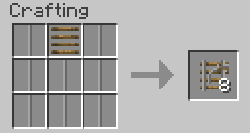
This rail is unique in that is can be placed vertically. When powered, it will power all the rails below it. Powered rails will lift minecarts up, unpowered rails will lower minecarts down. When a minecart reaches the top it will be pushed onto any normal rail located on the block above. The rail also doubles as a ladder.
High Speed Tracks:
This collection of rails is a little different from normal rails. Any carts travelling on these rails can travel three times faster than normal, but only in a straight line. Additionally, attempting to leave these rails without first slowing down will likely result in death and destruction. Collisions are bad too. Please sign the wavier before boarding.
See the wiki for more information.
Speed Rail
The basic high speed rail. They are made from a special iron-gold laminate rail mounted on stone sleepers and are capable of handling up to three times the speed of normal rails.
Speed Switch Rail
This rail will allow you to create true turnout switches when combined with a Switch Motor. Attempting to turnout at high speed is not recommended.
Speed Booster Rail
These rails will boost the cart when powered or slow them to normal minecart speed if they are not.
Speed Transition Rail
These directional rails will only boost carts in the direction of the arrows and only when powered. Carts travelling in the opposite direction will be slowed to normal minecart speeds.
Wooden Tracks:
For the leisurely tour routes, these new rails will give your passengers time to admire the scenery.
Wooden Rail
The basic wooden rail. Capable of making corners and traversing slopes. Functionally equivalent to normal rails, only with a lower maximum speed (for safety reasons).
Wooden Switch Rail
This rail will allow you to create true turnout switches when combined with a Switch Motor.
Wooden Booster Rail
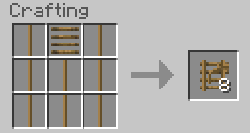
Functionally equivalent to Powered Rails, but in wooden rail form.
Wooden Junction Rail
Functionally equivalent to Junction Rails, but in wooden rail form.
Carts:
Tank Cart
This cart can store and transport any Buildcraft liquid. It is filled/emptied at a Liquid Loader/Unloader. It's capacity is the same as a Buildcraft Tank, 16 buckets.
TNT Cart
The ever popular explosive combination returns. Handle with care. Will explode if jarred or lit on fire. Great for parties. Can be used as a substitute for cannonballs or fireworks in a pinch. Fuse length can be adjust with a string. Fuse length is measured in 1/20ths of a second.
Tunnel Bore
Bores a 3x3 tunnel and lays rails, see the wiki for more information and the Bore Head recipes. If you are using any mods that add blocks to terrain gen, you will probably need to edit the Railcraft.cfg file and add their block IDs to "tweaks.minecarts.bore.mineableBlocks". Ores added to the Forge Ore Dictionary are automatically mineable.
Structures:
Concrete Block
A simple block that matches Stone Posts.
Wooden Post
A multi-purpose wooden framework capable of being used to create trestles, signal mounts, bridges, fences, telephone poles, etc...
Iron Post
A multi-purpose iron framework capable of being used to create trestles, signal mounts, bridges, fences, etc...
Can be painted different colors by surrounding any kind of dye with eight iron posts of any color.
Stone Post
A multi-purpose stone framework capable of being used to create trestles, signal mounts, bridges, fences, telephone poles, etc...
Signals:
Due to the complexity of Signals, most of the information is only available on the Railcraft Wiki. Signalling would be a good place to start.
Devices:
Coke Oven
The Coke Oven is an integral part of Railcraft as it produces Coal Coke and Creosote Oil when fed Coal. It is constructed out of 26 Coke Oven Bricks as a 3x3 cube with the center block missing. Please see the wiki for more information.
Detector Block
These Detector Blocks will detect any minecart that passes adjacent to them. They can be placed under or beside rails. They will only provide power in the direction with the light.
Detector - Storage
This detector only triggers on storage carts.
Detector - Powered
This detector only triggers on powered carts.
Detector - Any
This detector triggers on any cart.
Detector - Player
This detector only triggers on carts with a player in them.
Detector - Empty
This detector only triggers on empty carts that can be ridden.
Detector - Mob
This detector only triggers on carts with hostile mobs in them.
Detector - Animal
This detector only triggers on carts with animals in them. Has a GUI that allows you to select certain animals.
Detector - Explosive
This detector only triggers on explosive carts.
Detector - Advanced
Uses a GUI to select which carts it detects.
Loader
This block will fill any storage cart beneath it with the items from an adjacent block with an inventory (Chest, Furnaces, Unloaders, etc...). Buildcraft pipes can also supply items directly to the Loader's own hidden, internal inventory slot. When the cart is full the Loader will send out a redstone signal. The recommended setup is a Boarding Rail placed beneath the Loader. This rail will be automatically powered by the Loader. If you right-click on the Loader it will open a GUI with two options: "Wait if cart is empty", and "Wait till cart is full". If "Wait if cart is empty" is true, then empty carts will wait at the loader until they've received at least one item. If "Wait till cart is full" is true, then the cart will wait until it is completely full before moving on.
Unloader
This block will empty the contents of a storage minecarts inventory into a hidden, internal inventory slot. From there the items will be moved to adjacent blocks with inventories (Chest, Furnaces, Loaders, etc..) or can be piped out using Buildcraft. It will only empty carts that pass over the Unloader. The recommended setup is a Boarding Rail placed on top of the Unloader. The Unloader will send out a redstone signal when there is nothing to unload from the cart. If you right-click on the Loader it will open a GUI with one option: "Wait till cart is empty". If "Wait till cart is empty" is true, then the cart will wait until it is completely empty before moving on, even if there is no more room to place items.
Switch Motor
Combine with Switch Rails to create true turnout switches.
Cart Dispenser
Triggers on a positive redstone pulse and can store up to three carts. When triggered it will collect any minecart in front of it, or if there is no minecart and it has a cart in the inventory, it will place a cart on the rail.
Liquid Loader
This block will fill Tank Carts below it with any liquid piped into it. It has an internal capacity equivalent to four buckets. Otherwise it functions similar to your basic Loader.
Liquid Unloader
This block will empty Tank Carts above it into its internal reservoir. From there the liquid can be piped out with a Buildcraft Waterproof Pipes. It has an internal capacity equivalent to four bucket. Additional, if you put a bucket in the Filter slot of the GUI, the Unloader will only empty carts carrying the same liquid as the bucket. Otherwise it functions similar to your basic Unloader
Items:
Crowbar
A multi-purpose tool any rail engineer should carry. It makes removal of old rails a breeze and even works on Detector Blocks and Loaders. Additionally, right-clicking on a rail will allow you to adjust the rail. Most of the time that means reversing the rail's direction, but some rails will open a GUI. Right-clicking blocks that have an orientation will turn the block to face the side clicked on.
Wooden Tie
Your basic railroad tie. Created using Creosote Oil, which you get from cooking Coal or Wood in a Coke Oven.
Wooden Railbed
Every rail need support.
Stone Tie
A more sturdy sleeper for more advanced rails.
Stone Railbed
Stone is better than wood.
Notes on the Furnace Cart:
Thanks to the new collision code, Furnace carts can push other carts. It has been tested with up to five carts. The results indicate that while it can push up slopes and around curves, there are occasional glitches in which it will lose a cart or reverse directions. Mobs or items on the rails are often the cause, but sections with both slopes and corners can be a problem too. More work will be done to solve these issues, but for now I recommend well lit straight tracks with few elevation changes and something to keep the sheep and chickens away.
Planned Features:
New Rails - Yes, more are coming, but I'm taking ideas too! Most of the following ideas were provided by users.
Trap Rail - Similar to Suspended Rails but will drop the cart if powered by redstone.
Hidden Rail - A block that can be submerged in water or lava or pushed by pistons that possesses a retractable rail on top. (No this does not mean you can run minecarts underwater).
Steam Bridge - A Steam Powered Bridge that can extend/retrach.
More configuration options.
Addons for other Forge mods.
Improved rail rendering, someday.
Servers Running Railcraft
Servers running Railcraft can be found here.
Texture Packs:
Texture packs for Railcraft can be found -currently unavailable-
Check the wiki for more detailed instructions on how to obtain support.
If installation failed, DO IT AGAIN WITH A FRESH JAR!
If you are using the Technic Pack, you will have to go ask them if you have issues. I don't offer support for Technic Pack users.
Do not install any other mods until you know Railcraft is working and installed properly. This will help me know if the problem is a conflict with another mod. Once you are sure everything works with just Railcraft installed, add your other mods one at a time and test thoroughly after you install each one. The more information you have when you come to me with your problem, they more likely it will be that I can help you.
If you still have a problem, post your ForgeModloader-xxxx.log and/or crash report here along with a thorough description of your installation procedure and the problem. Helpful information includes version, SSP, SMP, or Bukkit, and OS. Please use spoiler and code tags when posting crash logs.
If you don't post the ForgeModloader-xxxx.log. I cant help you. Period.
Special Thanks:
The Forge Team for the awesome API.
Forecaster for being all around awesome and creating the Boiler Calculator.
smbarbour for the awesome Bukkit ports.
Direwolf20 for the excellent videos and occasional bug hunting.
Jeet for excellent videos and many ideas.
Bechill for helping get the wiki and IRC off the ground.
DizzyDragon for allowing me to incorporate the Elevator Tracks.
Foreplaying for the great Overalls texture.
Azanor for letting me use his Goggle texture as a base for the Trackman's Goggles.
eragonn1490 and KingLemmingCoFH for suggesting API improvements.
Chicken_bones and mistaqur for NEI support.
SirSengir for the Railcraft Forum.
xXxN4BxXx, Cassiobsk8, francogp, AskaRa, Vexatos and others for translations.
Legal Stuff:
For the complete list of legal info, please see Legal Info at the Railcraft Wiki.
I haven't tested it, but I believe that it will simply replace any changes BTW makes to minecarts. The BTW detector rails should work I think, but like I said before placement will be quirky. As for the Hopper, I have no idea.
pretty cool mod, would you be able to make a handcart and mabye cuplings?? I have no clue how hard it would be but a handcart and being able to make a train by cupling them together would be pretty cool....
pretty cool mod, would you be able to make a handcart and mabye cuplings?? I have no clue how hard it would be but a handcart and being able to make a train by cupling them together would be pretty cool....
I don't know about a handcart, but cart linking is planned.
Nice changes to the minecart collisions, sadly if you use BTW it will crash upon activating any of the detector rails it got with a class cast exception:
java.lang.ClassCastException: FCBlockDetectorRail cannot be cast to railcraft.BlockRCRail
at railcraft.EntityRCMinecart.i(EntityRCMinecart.java:485)
at railcraft.EntityRCMinecart.a(EntityRCMinecart.java:464)
at railcraft.RenderRCMinecart.func_152_a(RenderRCMinecart.java:37)
at railcraft.RenderRCMinecart.a(RenderRCMinecart.java:102)
at aam.a(aam.java:125)
at aam.a(aam.java:119)
at i.a(RenderGlobal.java:359)
at iw.a(EntityRenderer.java:1008)
at iw.b(EntityRenderer.java:801)
at EntityRendererProxy.b(EntityRendererProxy.java:15)
at net.minecraft.client.Minecraft.run(SourceFile:689)
at java.lang.Thread.run(Unknown Source)
Read up - there are specific comments about turning off BTW's minecart modifying behaviour...
That has nothing to do with BTWs minecart edits, that just changes the de-acceleration of the carts in the EntityMinecart class
and anyway I got that turned off.
This is an error causes by this mod overriding the default minecart classes, which breaks the detector rails in BTW as they extend the default detector rail
wow this seems amazeing but if you add magnet cartys and magnet rails it can open up new
rollar coater possabilitys like magnet ones can go ion the side and updide down magnet carts are to be used on magnet rails
the stay on them normal ones would just fall if on side or up side down
let me know if you like idea :biggrin.gif:
Actually, I can fix that error. It's in a part of the minecart code I didnt touch, I didnt realize there was another cast there. I already have similar code in other parts to prevent that from happening.
And I have considered allowing rails to be placed on vertical surfaces and ceilings, but decided against it for now due to issues with implementation and flavor. I have a lot of other things I would like to do first.
New version posted with the non-railcraft rail crash fixed. Let me know if you find any more bugs.
The worst that should happen when using non-Railcraft rails is placement logic quirks. In the case of modded minecarts on Railcraft rails the worst should be that the minecart treats it like the rail isnt there.
I could fix both of these issues with minor basefile changes to BlockRail and EntityMinecart, but that would probably break other things so I didnt bother. Eventually I hope Forge will allow me to define tile entities for blocks that extend BlockRail. That should remove most incompatibilities.
Have you asked spacetoad/flowerchild/albalka/eloraam about adding the facility on the Mineforge thread?
Great Idea! Good mod too. Too bad we have to choose between this and Steve's carts though. Have had that installed quite a while and think he just updated it. Pyro's Mineforge thought is very good.
Keep up the great work! Will use this in a different mod mix. (Currently Buildcraft, IC2, and BTW.) This one would fit into the industrialness of them all :smile.gif:
-
View User Profile
-
View Posts
-
Send Message
Curse PremiumDescription:
Have you ever wished minecarts and rails had received a bit more attention during development? Well that ends now! Gone are all those broken bits and in their place are a ton of new tools to build your massive rail system. If you ever cared about rails, you wont ever look back!
Features:
Pictures:
DizzyDragon's Elevator Rails:
Tunnel Bore
Posts and Signals
Railcraft Wiki
IRC: #railcraft (esper.net)
Social Media:
CovertJaguar's Twitter
RailcraftDev's Twitter
CovertJaguar's YouTube
Download Railcraft:
Downloads can be found on the Blog's Download Page, or use the widget below.
Change Logs:
Please see the wiki for information on Railcraft versions.
Compatibility:
Some things in the mod:
See wiki for full listing.
New recipes, same old rails.
- Rail

- Powered Rail

- Detector Rail

Advanced Tracks:- Locking Track

- One-Way Rail

- Control Rail

- Launch Rail

- Priming Rail

- Junction Rail

- Switch Rail
- Elevator Rail

High Speed Tracks:When unpowered these tracks will grab and hold onto any cart that passes over them. And unlike Booster Rails, the cart can't be pushed off. Additionally, when placed the rail will have an arrow on one side. When an unpowered rail with a minecart on it becomes powered, it will launch the cart in that direction.
When unpowered these rail behave like normal rails. But when they receive power they will reverse the momentum of any cart travelling in the wrong direction. Some momentum is lost of course.
These rails act like weak boosters that only boost carts in one direction. Any carts travelling in the opposite direction will be gradually slowed. Powering them will reverse the direction of the rail. They are cheap to make and will propagate power for up to sixteen blocks in either direction.
Maybe not very realistic, but a ton of fun anyway. This rail will launch any cart that passes over it into the air. Launch force can be adjusted by right-clicking on the rail with a Crowbar.
This rail will light the fuse of any explosive cart that passes over it. Fuse length can be adjusted by right-clicking on the rail with a Crowbar. Fuse length is measured in 1/20ths of a second.
This rail will allow you to place "diamond" junction crossings.
This rail will allow you to create true turnout switches when combined with a Switch Motor.
Original code, concept, and texture by DizzyDragon
This rail is unique in that is can be placed vertically. When powered, it will power all the rails below it. Powered rails will lift minecarts up, unpowered rails will lower minecarts down. When a minecart reaches the top it will be pushed onto any normal rail located on the block above. The rail also doubles as a ladder.
This collection of rails is a little different from normal rails. Any carts travelling on these rails can travel three times faster than normal, but only in a straight line. Additionally, attempting to leave these rails without first slowing down will likely result in death and destruction. Collisions are bad too. Please sign the wavier before boarding.
See the wiki for more information.
- Speed Rail

- Speed Switch Rail

- Speed Booster Rail

- Speed Transition Rail

Wooden Tracks:The basic high speed rail. They are made from a special iron-gold laminate rail mounted on stone sleepers and are capable of handling up to three times the speed of normal rails.
This rail will allow you to create true turnout switches when combined with a Switch Motor. Attempting to turnout at high speed is not recommended.
These rails will boost the cart when powered or slow them to normal minecart speed if they are not.
These directional rails will only boost carts in the direction of the arrows and only when powered. Carts travelling in the opposite direction will be slowed to normal minecart speeds.
For the leisurely tour routes, these new rails will give your passengers time to admire the scenery.
- Wooden Rail

- Wooden Switch Rail
- Wooden Booster Rail

- Wooden Junction Rail

Carts:The basic wooden rail. Capable of making corners and traversing slopes. Functionally equivalent to normal rails, only with a lower maximum speed (for safety reasons).
This rail will allow you to create true turnout switches when combined with a Switch Motor.
Functionally equivalent to Powered Rails, but in wooden rail form.
Functionally equivalent to Junction Rails, but in wooden rail form.
- Tank Cart

- TNT Cart

- Tunnel Bore

Structures:This cart can store and transport any Buildcraft liquid. It is filled/emptied at a Liquid Loader/Unloader. It's capacity is the same as a Buildcraft Tank, 16 buckets.
The ever popular explosive combination returns. Handle with care. Will explode if jarred or lit on fire. Great for parties. Can be used as a substitute for cannonballs or fireworks in a pinch. Fuse length can be adjust with a string. Fuse length is measured in 1/20ths of a second.
Bores a 3x3 tunnel and lays rails, see the wiki for more information and the Bore Head recipes.
If you are using any mods that add blocks to terrain gen, you will probably need to edit the Railcraft.cfg file and add their block IDs to "tweaks.minecarts.bore.mineableBlocks". Ores added to the Forge Ore Dictionary are automatically mineable.
- Concrete Block

- Wooden Post

- Iron Post

- Stone Post

Signals:A simple block that matches Stone Posts.
A multi-purpose wooden framework capable of being used to create trestles, signal mounts, bridges, fences, telephone poles, etc...
A multi-purpose iron framework capable of being used to create trestles, signal mounts, bridges, fences, etc...
Can be painted different colors by surrounding any kind of dye with eight iron posts of any color.
A multi-purpose stone framework capable of being used to create trestles, signal mounts, bridges, fences, telephone poles, etc...
Due to the complexity of Signals, most of the information is only available on the Railcraft Wiki. Signalling would be a good place to start.
Devices:
The Coke Oven is an integral part of Railcraft as it produces Coal Coke and Creosote Oil when fed Coal. It is constructed out of 26 Coke Oven Bricks as a 3x3 cube with the center block missing. Please see the wiki for more information.
This detector only triggers on storage carts.
This detector only triggers on powered carts.
This detector triggers on any cart.
This detector only triggers on carts with a player in them.
This detector only triggers on empty carts that can be ridden.
This detector only triggers on carts with hostile mobs in them.
This detector only triggers on carts with animals in them. Has a GUI that allows you to select certain animals.
This detector only triggers on explosive carts.
Uses a GUI to select which carts it detects.
- Loader

- Unloader

- Switch Motor

- Cart Dispenser

- Liquid Loader

- Liquid Unloader

Items:This block will fill any storage cart beneath it with the items from an adjacent block with an inventory (Chest, Furnaces, Unloaders, etc...). Buildcraft pipes can also supply items directly to the Loader's own hidden, internal inventory slot. When the cart is full the Loader will send out a redstone signal. The recommended setup is a Boarding Rail placed beneath the Loader. This rail will be automatically powered by the Loader. If you right-click on the Loader it will open a GUI with two options: "Wait if cart is empty", and "Wait till cart is full". If "Wait if cart is empty" is true, then empty carts will wait at the loader until they've received at least one item. If "Wait till cart is full" is true, then the cart will wait until it is completely full before moving on.
This block will empty the contents of a storage minecarts inventory into a hidden, internal inventory slot. From there the items will be moved to adjacent blocks with inventories (Chest, Furnaces, Loaders, etc..) or can be piped out using Buildcraft. It will only empty carts that pass over the Unloader. The recommended setup is a Boarding Rail placed on top of the Unloader. The Unloader will send out a redstone signal when there is nothing to unload from the cart. If you right-click on the Loader it will open a GUI with one option: "Wait till cart is empty". If "Wait till cart is empty" is true, then the cart will wait until it is completely empty before moving on, even if there is no more room to place items.
Combine with Switch Rails to create true turnout switches.
Triggers on a positive redstone pulse and can store up to three carts. When triggered it will collect any minecart in front of it, or if there is no minecart and it has a cart in the inventory, it will place a cart on the rail.
This block will fill Tank Carts below it with any liquid piped into it. It has an internal capacity equivalent to four buckets. Otherwise it functions similar to your basic Loader.
This block will empty Tank Carts above it into its internal reservoir. From there the liquid can be piped out with a Buildcraft Waterproof Pipes. It has an internal capacity equivalent to four bucket. Additional, if you put a bucket in the Filter slot of the GUI, the Unloader will only empty carts carrying the same liquid as the bucket. Otherwise it functions similar to your basic Unloader
A multi-purpose tool any rail engineer should carry. It makes removal of old rails a breeze and even works on Detector Blocks and Loaders. Additionally, right-clicking on a rail will allow you to adjust the rail. Most of the time that means reversing the rail's direction, but some rails will open a GUI. Right-clicking blocks that have an orientation will turn the block to face the side clicked on.
Your basic railroad tie. Created using Creosote Oil, which you get from cooking Coal or Wood in a Coke Oven.
Every rail need support.
A more sturdy sleeper for more advanced rails.
Stone is better than wood.
Notes on the Furnace Cart:
Thanks to the new collision code, Furnace carts can push other carts. It has been tested with up to five carts. The results indicate that while it can push up slopes and around curves, there are occasional glitches in which it will lose a cart or reverse directions. Mobs or items on the rails are often the cause, but sections with both slopes and corners can be a problem too. More work will be done to solve these issues, but for now I recommend well lit straight tracks with few elevation changes and something to keep the sheep and chickens away.
Planned Features:
Servers Running Railcraft
Servers running Railcraft can be found here.
Texture Packs:
Texture packs for Railcraft can be found -currently unavailable-
Banners:
Banners by serialtasted:
Support:
Special Thanks:
Legal Stuff:
For the complete list of legal info, please see Legal Info at the Railcraft Wiki.
and this WILL NOT work with BTW's minecart(maybe minefactory)
RPing as "Urbanliner" in Roleplayer Guild.
-
View User Profile
-
View Posts
-
Send Message
Curse PremiumEdit: I really like this mod and it made it even better that it is Forge compatible. :biggrin.gif:
-
View User Profile
-
View Posts
-
Send Message
Curse PremiumI don't know about a handcart, but cart linking is planned.
oh nice.... that would be a first for a mod, would be very very useful, :biggrin.gif:
-
View User Profile
-
View Posts
-
Send Message
Curse Premium-
View User Profile
-
View Posts
-
Send Message
Curse Premium-
View User Profile
-
View Posts
-
Send Message
Curse PremiumWell I wanted to avoid making another wrench, but I suppose I could. =P
I've never had any trouble placing rails though. Just face the direction you wish them to be placed.
-
View User Profile
-
View Posts
-
Send Message
Curse Premiumjava.lang.ClassCastException: FCBlockDetectorRail cannot be cast to railcraft.BlockRCRail
at railcraft.EntityRCMinecart.i(EntityRCMinecart.java:485)
at railcraft.EntityRCMinecart.a(EntityRCMinecart.java:464)
at railcraft.RenderRCMinecart.func_152_a(RenderRCMinecart.java:37)
at railcraft.RenderRCMinecart.a(RenderRCMinecart.java:102)
at aam.a(aam.java:125)
at aam.a(aam.java:119)
at i.a(RenderGlobal.java:359)
at iw.a(EntityRenderer.java:1008)
at iw.b(EntityRenderer.java:801)
at EntityRendererProxy.b(EntityRendererProxy.java:15)
at net.minecraft.client.Minecraft.run(SourceFile:689)
at java.lang.Thread.run(Unknown Source)
That has nothing to do with BTWs minecart edits, that just changes the de-acceleration of the carts in the EntityMinecart class
and anyway I got that turned off.
This is an error causes by this mod overriding the default minecart classes, which breaks the detector rails in BTW as they extend the default detector rail
rollar coater possabilitys like magnet ones can go ion the side and updide down magnet carts are to be used on magnet rails
the stay on them normal ones would just fall if on side or up side down
let me know if you like idea :biggrin.gif:
plz don't discriminate about my spelling i know it sucks but i try my best
-
View User Profile
-
View Posts
-
Send Message
Curse PremiumAnd I have considered allowing rails to be placed on vertical surfaces and ceilings, but decided against it for now due to issues with implementation and flavor. I have a lot of other things I would like to do first.
-
View User Profile
-
View Posts
-
Send Message
Curse PremiumThe worst that should happen when using non-Railcraft rails is placement logic quirks. In the case of modded minecarts on Railcraft rails the worst should be that the minecart treats it like the rail isnt there.
I could fix both of these issues with minor basefile changes to BlockRail and EntityMinecart, but that would probably break other things so I didnt bother. Eventually I hope Forge will allow me to define tile entities for blocks that extend BlockRail. That should remove most incompatibilities.
Great Idea! Good mod too. Too bad we have to choose between this and Steve's carts though. Have had that installed quite a while and think he just updated it. Pyro's Mineforge thought is very good.
Keep up the great work! Will use this in a different mod mix. (Currently Buildcraft, IC2, and BTW.) This one would fit into the industrialness of them all :smile.gif: